Product Review: SocialBee – Here is a wonderful Social media sharing Platform. Boost your Business Now.
What is SocialBee ?
SocialBee is a social media management platform. At its core, it helps users plan, create, schedule, publish, analyze, and manage content across multiple social media networks — all from a single interface. It also includes tools to help you engage, recycle content, collaborate with teams, and use AI to streamline content creation. Boost your business by sharing content in Social media now and reap great benefits.
SocialBee is a user-friendly social media scheduling tool.
It’s a comprehensive platform designed to manage, optimize, and grow your social media presence from a single dashboard. SocialBee offers an array of features to make social media management a breeze.
The complete solution to take care of your social media profiles. From designing fresh content to scheduling, engaging, collaborating, and tracking your results, we make social media simple, smart, and stress-free for you.
Socialbee is Your all-in-one social media scheduler and assistant.
SocialBee key features
SocialBee’s post composer has the features and ease-of-use you expect from a social scheduling tool.
First, you’ll see your connected social profiles at the top of the composer. SocialBee lets you schedule and publish content on:
Facebook
Instagram
LinkedIn
X (Twitter)
TikTok
YouTube
Pinterest
Google Business
Threads
Bluesky
After you select the profiles to publish to, there’s a caption box to write your social caption.
But beyond that, you can edit the post for individual social platforms.
Create, generate, and design.
SocialBee makes content creation fast and easy, helping you craft and customize posts that fit your brand and platforms perfectly.
Use Canva, Unsplash and GIPHY directly from SocialBee. Boost your team’s productivity with SocialBee’s collaboration features, streamlining brand management and eliminating the need for additional communication tools.
Generate captions, images and hashtags with AI.Customize your posts for every channel.
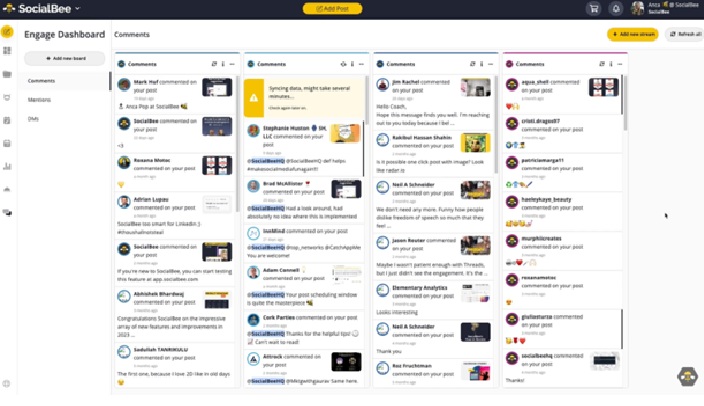
Keep an eye on comments, mentions, and DMs from one place, interact with your online community, and build loyalty by responding quickly.
We help thousands of professionals succeed on social media.
Why I Prefer SocialBee Over Other Tools?
Finding the right social media scheduling tool can be a daunting task, but with SocialBee, I’ve found my perfect match. It’s helped me streamline my social media strategy, save time, and maintain a consistent online presence, all while providing the flexibility and support I need to succeed.
Having tried various scheduling tools over the years, I’ve found SocialBee to stand out for its user-friendly interface, comprehensive features, and the fact that it caters to all my needs in one platform.
Whether it’s the ease of recycling content, the seamless Canva integration, or the ability to collaborate effortlessly with my team, SocialBee has simplified how I manage social media.
Schedule Setup:
While the Schedule Setup has a calendar, it works essentially as a planner.
The setup shows the content categories and their time slots in a typical week.
For example, you’ll see categories like blog posts, industry news, case studies, etc.
So, having industry news on Mondays and Thursdays means you should have two social media posts for that category and time slots every week.
Analytics:
Unlike some tools I’ve reviewed, SocialBee provides analytics for all my connected accounts.
It provides metrics in categories, such as:
Page analytics: Here, you’ll get metrics like the number of posts, profile growth, and the number of followers. There’s also engagement distribution in terms of likes and comments.
Post analytics: This provides engagement metrics for posts and different post types.
Insights: Here, you’ll find post distribution, top post types, and top categories.
Post history: This shows posts for the selected social profile.
Beyond these, you have competitor analysis for Facebook pages to compare your metrics with competitors’.
Integrations
Integrations help you connect with other platforms to improve your social media results.
SocialBee provides integrations in categories like:
Design (Canva, Unsplash, and GIPHY)
Content curation (Pocket and Quuu)
URL shorteners (Bitly, Switchy, Replug, etc.)
Automation (Zapier, Pabbly, Make, etc.)
So, if you already have an account with any of these tools, you can integrate SocialBee with them to open up more use cases.
To learn how to integrate SocialBee with a tool, scroll to the bottom of your SocialBee dashboard and click on the tool. Doing this will take you to a help article that will guide you through the process.

Mobile apps:
SocialBee has mobile apps for Android and iOS.
The Android version I installed has three sections:
Content: Here, you’ll see overdue and upcoming content.
Published: This section contains published posts and their dates.
Profile: Here, you’ll see your workspaces and the number of accounts connected to each account.
Apart from these sections, the app can send notifications about posts you have to publish from a social media native app.
SocialBee pros and cons
SocialBee pros
Easy to use
Affordable
Excellent social content planning
Robust scheduling
Robust social content creation
AI caption and image generator
SocialBee cons
Limited collaboration features
Limited engagement features
No link in bio
Underwhelming mobile app
SocialBee customer support
SocialBee offers customer support through:
In-app tutorials
Help articles
Contact form
Phone call
Email
Chat button
Based on my experience, the in-app tutorials and help articles answer most questions you may have about the tool. So, you won’t have many reasons to reach out to the customer support reps.
SocialBee pricing:
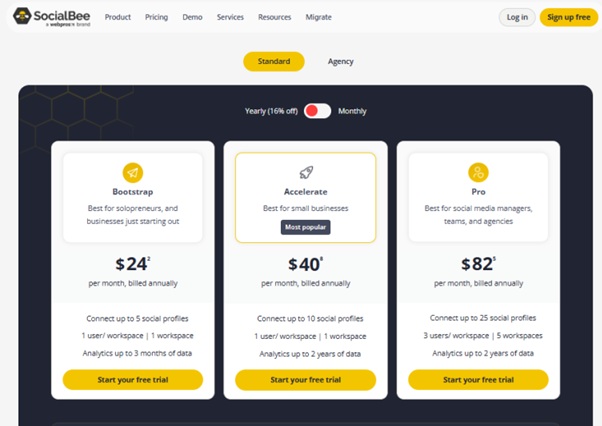
SocialBee has 3 standard pricing plans:
Bootstrap: This plan comes with 5 social profiles, 1 user per workspace, and 1 workspace. You also get AI-powered copilot, analytics data of up to 3 months, and the Engage module. The Bootstrap plan costs $29 monthly ($24.2 on an annual plan).
Accelerate: It comes with 10 social profiles, 1 user per workspace, and 1 workspace. You also get analytics data of up to 2 years. The Accelerate plan costs $49 monthly ($40.8 on an annual plan).
Pro: It comes with 25 social profiles, 3 users per workspaces, and 5 workspaces. You can also export branded reports and send internal notes. The Pro plan costs $99 monthly ($82.5 on an annual plan).
Apart from the standard plans, SocialBee also offers agency plans. So, if you run a social media agency, check out these plans.
Take advantage of SocialBee’s 14-day free trial to see how the tool works.
Conclusion
SocialBee focuses on creating and scheduling social media posts.
So, if you’re looking strictly for a social media scheduling and analytics tool, SocialBee is one of the best options available.
However, its collaboration features lag behind competitors, and a feature like link in bio is missing.
And again, you can’t do a lot on the mobile app if you need to schedule posts on the go.
That said, SocialBee is a social media management tool that fits the needs of thousands of marketers.
If SocialBee looks like what you need, explore it further through a free 14-day trial.
Try SocialBee today itself.
#facebook #twitter #linkedin #Instagram #socialsharing #SocialBee #socialsharing